2.1 Learning environment
2.1.1 - Create and nurture an information rich learning environment which supports the needs of the school community
Evidence of the ways in which the Director of the Learning Centre and I create and nurture an information rich learning environment that supports the needs of the school community is found throughout this portfolio. The Learning Centre is very well resourced and adequately staffed and the service we provide to the school community is high quality. Over recent weeks we have been involved in the design of the new Learning Centre building and the new Learning Management System (e-Learning platform). Our existing LMS is a combination of TASS for student and teacher information, and Moodle which in our school is user unfriendly and inadequate for our needs. The new LMS is being created specifically for our College and will incorporate the most advanced features available ensuring our students can communicate, collaborate and investigate effectively. The physical learning environment is two demountable buildings joined together is not of our choosing. Staff have worked hard to ensure the interior environment is bright, welcoming and filled with displays and information relevant to our students. Powerpoint presentations of the interior and exterior are found in Section 2.1.3.
2.1.2 - Provide access to information resources through efficient, effective and professionally managed systems
Our Learning Centre is a professionally managed service that provides efficient, effective access to information resources. In 2011 we introduced the use of OneNote to keep our procedures, meeting minutes, teaching programs and digital files. The ability to work collaboratively online has been a huge bonus and the level of communication has improved as a result. Although only recently introduced both teachers and the three aides have adopted its use very quickly.
Students are taught from Year 3 how to use the Libcode OPACs both at school and at home through the internet. During the primary years students learn to access the online encyclopedia and the SLASA online reference generator (details follow). From Year 7 databases, referencing and bibliographies are introduced as well as in-text citation. Staff are constantly teaching students to locate resources and how to assess quality and relevance in the sources they find.
2.1.3 - Foster an environment where learners are encouraged and empowered to read, view, listen and respond for understanding and enjoyment.
The Lost Thing Activity
Years 4 to 7 enjoyed viewing the Academy Award winning Short Animation which brings to life the wonderful story by Shaun Tan. The narration by Tim Minchin follows the text exactly and the images are pure Shaun Tan. Following the viewing I posed two questions and collected the responses on paper.
a. The Lost Thing is a ____________________________ film.
b. The Lost Thing made me feel _______________.
I collected the one word responses and turned them into wordles for display in the Learning Centre.
Yr 7 felt the lost thing was a click film & Year 4 student response wordle is below right.
Yr 7 responses to the statement 'The Lost Thing' film made me feel Click here for wordle.
The Lost Thing activity could be improved by allowing students creative control of the wordles. Students could generate their own adjectives in pairs then create the wordle themselves choosing colours and style that suited the narrative.
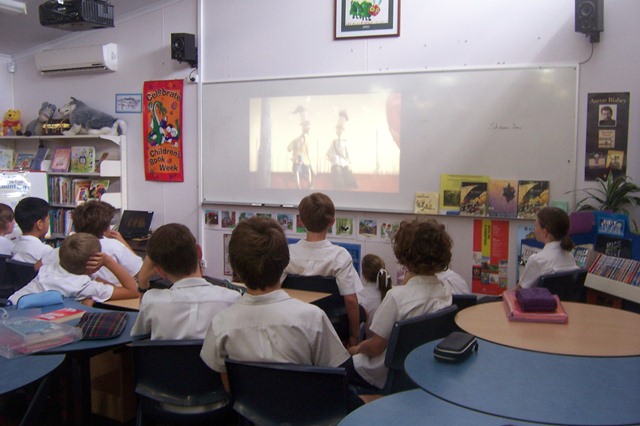 | 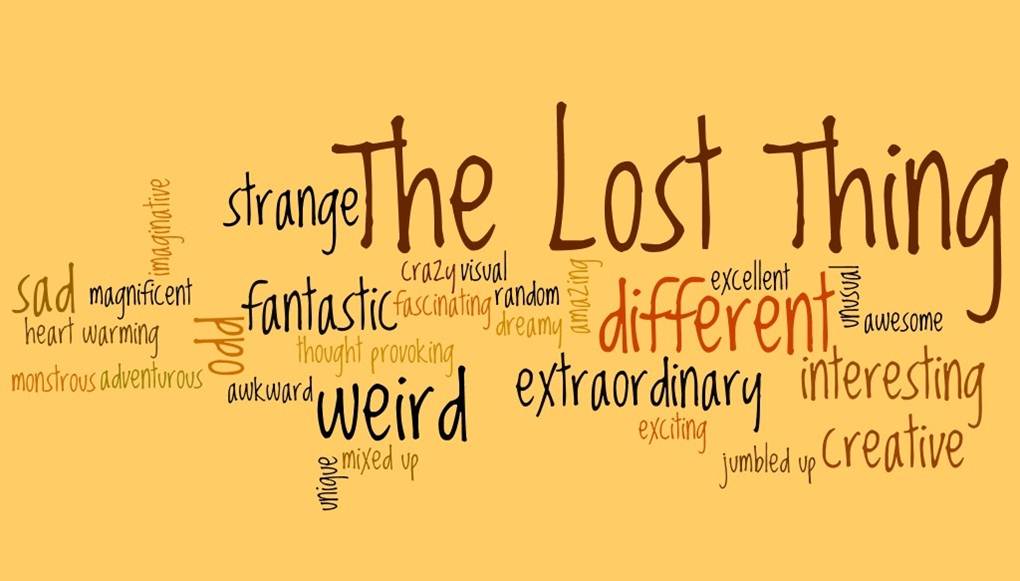 |
Year 6 students viewing 'The Lost Thing' by Shaun Tan. Year 4 adjectives to describe 'The Lost Thing' by Shaun Tan.
Year 6 Readers' Cup
Students in Years 6, 7 and 8 participate in (our school's) Readers' Cup competitions. Years 7, 8 & 9 compete in the regional Interschool Competition. The Year 6 competition includes all students in Year 6 and successfully broadens students reading choices and encourages students to attempt as many of the eight set novels as they can manage. This activity is run collaboratively with the Year 6 English teacher and lays the groundwork for participation in Readers' Cup competitions in Years 7, 8 & 9.
The Process:
-
Year 6 English teacher and I select the eight novels to be included. A range of genre, level of difficulty, male/female protagonists, multicultural settings and length are chosen for the students to read.
-
Year 6 English teacher appoints 5 team leaders per class, taking care to choose highly competent readers with good team skills. Five more students of mixed ability and gender are added to each team forming 5 teams of 6 students per class.
-
I spend a lesson introducing and promoting the eight novels by reading the blurbs, or giving background to the author, or reading an excerpt.
-
Students begin borrowing in the final week of Term 2 so reading can commence over the holidays.
-
The LC director and I scrutinise the questions to ensure accuracy and a lack of ambiguity.
-
The week prior to Book Week each class has a semi-final held in the Learning Centre with myself as the presenter and the LC Director as scorer/timekeeper.
-
The winners of each semi-final then compete in the Final held in Children's Book Week with all of Year 6 & 5 as their audience. The winning team are awarded trophies and certificates and the other finalists receive certificates.
When I surveyed the Year 6 students in October 2011 regarding the best book they had read this year, many of them nominated one of the Readers' Cup books. Year 7 students also frequently mentioned Year 6 Readers' Cup titles when quizzed about books they had enjoyed in the past year or two.
Year 7 students are invited to participate in the In-house Readers' Cup early in Term 1. For these students the ability to form their own team is a considerable drawcard and this year we had 32 students sign up for the competition which is optional. The winners of this competition go on to represent the school in the Regional Interschool Competition. This was a wonderful evening with Dave Hackett as the guest speaker. Our team scored well in the heats and made the finals, eventually coming in second place.
The Year 7 in-house competition was an initiative of mine in 2011. I selected the texts, wrote the questions and organised the competition. For its inaugural year it was deemed as a successful way to broaden students' reading experiences, experience a team situation and compete in a fun and friendly way.
The Year 8 in-house Readers' Cup competition attracts a smaller number of teams - 2010 there were four teams and 2011 three teams. The benefits for the competitors are high, and whilst the rest of the cohort serve as audience members for the final, it does not seem to engage students who aren't already dedicated readers.
In 2010 our Year 8 team won the Regional Final. The indirect benefits of the Readers' Cup competition were all in evidence here. The students' self esteem and confidence increased, their ability to work collaboratively in a team improved and their communication and social skills were enhanced by this chance to represent the school in a regional event. This same team entered the Year 9 competition in 2011 and once again won the final. This meant they became the Regional representatives in the State Competition in Brisbane in September. On both occasions these students were able to meet and learn from authors such as Prue Mason and Maggie Steifvater.
For the 2011 Year 9 State competition the rules of the Readers' Cup were changed and a new question format was introduced. Traditionally Readers' Cup questions are straight recall as these are the easiest to score as correct or incorrect. The State team organisers this year used questions that were:
- Recall
- Reflect
- Relate
- Review
The rationale and example questions are included here. The organiser from the Children's Book Council of Australia explained to me that the competition had attracted criticism over the years for not challenging students to engage more intellectually with the texts.
A book trailer component was also included in the competition for the first time with the score for this being included in the final total. These changes stimulated considerable debate at Regional level as we considered whether to make similar changes. At this stage no decision has been reached, but the Year 8 2011 Regional competition introduced a 'viewing' component by including the DVD 'The Lost Thing' as one of the set titles. Questions regarding this film (& book) formed part of the heats and final, and a clip from the film was shown in the finals with visual/viewing questions asked directly after the clip was shown. This worked well on the night and may be included in the future if a suitable resource comes along. My involvement in the Regional Competitions includes suggesting, reading and selecting novels for inclusion, writing and checking questions, and as a presenter or photographer on the evening.
2.1.4 - SPP Portfolio 1
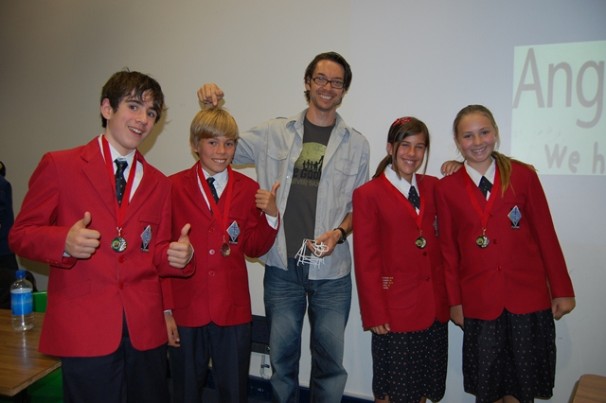 |  |
2011 Year 7 Regional Team win 2nd place. Author Dave Hackett was guest speaker. Year 8 In-house Competition winning team
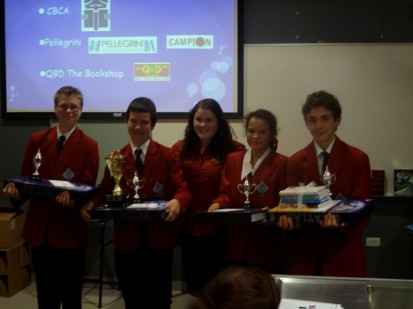 | 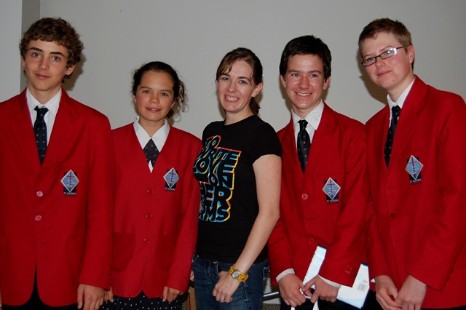 |
2010 Year 8 Regional Winners 2011 Year 9 State Finalists with Maggie Steifvater
2.1.3 Learning Centre Environment.
Once inside the Learning Centre the environment is bright, colourful & friendly with students, parents, staff and visitors welcomed warmly. The Learning Centre is a temporary building, two demountables joined together. This arrangement will remain until 2013 when a new purpose built Learning Centre is erected adjacent to the current demountables. The exterior of the current Learning Centre is far from ideal. It is not possible to see inside the building from outside and only one sign indicates that it is the Learning Centre. This powerpoint shows the external views including where the extension was to be added. The plans for the extension were shelved once the new Learning Centre construction date went from 2015 to 2013.
This powerpoint shows the interior of the Learning Centre and focusses on what is valued. The final slide shows the security gates indicating that security is valued. Unfortunately they are unsightly and people must walk up and over a little ramp that makes a clicking sound as though the floor is creaky. It was almost 18 months before I discovered this was an electronic counter. The gates had been purchased second hand and were fairly inexpensive. With the design of the new Learning Centre well under way, we have been researching entrances that combine security with an open, welcoming feel. The door to the Learning Centre is heavy to pull open and the window is small, high up and covered with a faded 'opening hours' sign. There is no visibility through this door and small children struggle to open it. My requests to have the 'return' less strong was answered, but there isn't much that can be done about the heaviness of the door itself.
With our 'no food or drinks' in the Learning Centre policy in place to protect resources and discourage cockroaches, we found that students were putting their food and possessions on the floor of the deck outside the door. I asked for a small shelf to be installed to alleviate this problem, but unfortunately a large unattractive bag rack was installed instead. This only adds to the unappealing view as the Learning Centre is approached. Bright signage may help, but it must fit with the College's sign style. Click on the images below to view.
2.2 Learning and Teaching 2.2.1 collaborate with teachers to plan and implement information literacy and literature programs that result in positive student learning outcomes.
I work collaboratively with teachers in Years 4, 5 & 6 to plan each week's library session. We cover a range of skills including those found in the ILPO document (1.1.1). Promoting reading and literature also takes place and we use a range of activities to encourage students to embrace reading for enjoyment.
Year 6 Audio Book Project
The Year 6 English teacher and I collaborated this year to create a new unit where the Year 6 students wrote and recorded an audio book for their prep buddies. My role involved:
- Exposing students to JF picture books - using the 2011Shortlisted Earlly Childhood books as a starting point
- Using the Mem Fox website - in particular her section called 'And do it like this' (click 'back' to return)
- Hear Mem Fox read a book of the students choice
- Arrange for students to practice reading JF books to their own class
The unit was very successful - the young buddies enjoyed hearing the recorded stories and the Year 6 students enjoyed writing the narrative and learning to read expressively.
Year 7 Resources, referencing and in-text citation
The Year 7 Science teacher brought her classes for a series of lessons on how to locate appropriate resources, take notes without plagiarising, in-text citations and referencing. The Powerpoint I prepared set out all the necessary steps to follow. Students worked on their assignment in the Learning Centre so I could give hands on assistance as they used the skills. The first half of the sessions went well with students understanding the use of the Blue referencing book and the SLASA Reference Generator (a link appears below). The introduction of the referencing tool in Microsoft Word was a lot less successful. My experience was limited and student's attempts at using it caused them considerable frustration. I need to give clearer examples when talking about in-text citations. Students were struggling to grasp how this would look even though I had print screens of examples. They need to see how their assignment would look with the in-text citations included. Next time I run this unit I will add much clearer examples.
2.2.2 ensure that their programs are responsive to the needs of learners in the school community
2.2.3 support learning and teaching by providing equitable access to professionally-selected resources
Equitable Access and Information Ethics
The chief concern of information ethics involves who should have access to what information (Fallis, 2007, p3). Information ethics includes the core issues of intellectual freedom, equitable access to information, information privacy and intellectual property. As librarians and information professionals it is essential that we support intellectual freedom and resist censorship in order to provide people with the access to information they need. This issue of who has access to what information becomes cloudy in my current role as we continually judge the content of resources, particularly novels, in terms of their age appropriateness. Children from 3 to 18 years of age as well as adults all use our Learning Centre. We have year level restrictions on our Senior Fiction and Middle Fiction shelves and we must constantly review the decisions we make regarding the placement of books on specific shelves. As mentioned before, we have a book challenge policy but we have not yet had a parent challenge a book.
Frozen Books
Each term we encounter the problem of having insufficient print resources for a Year Level working on an assignment. If we allowed Senior Non Fiction books to be borrowed for research purposes, only a small number of keen students would have access to the resources. To overcome this problem, Head of Faculty provide us with details of their upcoming assignments and which books they would like 'Frozen'. These books are located, put in a buffer file, labelled e.g. Yr8NaturalDisasters, and they status is changed to 'not for loan'. They are kept on a special shelf in the SNF area where classes are able to book in to access the resources. Students are welcome to use the books before and after school and in the breaks. This strategy has worked successfully with teachers and students happy with the outcome.
2.2.4 Assist individual learners to develop independence in their learning
One example of how we achieve this outcome is by enabling students to take home Clickview programs. This is done through the Clickview School Bag procedure and it means that students can take a documentary home to use at their convenience. Other examples of encouraging independence are found throughout this portfolio.
2.2.5 Teach the appropriate and relevant use of ICT and information resources
It's not about the Tools. It's about the Skills.
An excellent addition to the secondary end of the Learning Centre was the four posters found in Silvia Rosenthal Tolisano's blog 'Langwitches'. We were able to blow up these posters by visiting her Flickr page as she suggests and they attracted plenty of comments when first displayed. When using the 'tools' I make the 'skills' explicit to students so they make the connection. As Rosenthal Tolisano points out, 'We are not podcasting in order to teach Audacity nor Garageband. We are not recording students for the fun of using microphone, we are not blogging, so we can practice typing, we are not skyping for the purpose of using a webcam' (2011).
SLASA Online Reference Generator
Up until the middle of last year the school was using the print version of The Guide for Referencing and Bibliographies for Secondary School Students by Jennifer King, published by SLAQ (School Library Association of Queensland). I ran activities for Years 7, 8 & 9 to teach the use of this referencing guide. Generally I used examples related to assignments students were covering and assisted students to use the guide as they compiled their bibliographies and in-text citations. Whilst there are many online reference generators available on the internet, our school has a strict policy of using the Harvard AGPS style. When SLASA (School Libary Association of South Australia) developed their online reference generator in the Harvard AGPS style we added the 'button' to our website and promoted its use. This entailed a series of lessons for Years 7 - 12 to demonstrate the use of this fantastic tool. Recently SLASA have added password protection and required a yearly subscription of approximately $80 which our school happily pays to access this user friendly generator.
Earlier this year I also arranged for the IT department to add Harvard AGPS style to the drop down menu found in the 'references' tab above MS Word documents. This was introduced to students at the same time as the SLASA generator but the tool is not user-friendly and only a few students became adept at using it. I found it difficult to use - this is an area where I could seek some training so I can pass this skill on to students.
Locating Resources, accessing Databases, and referencing refresher session for Year 10 students.
These sessions are conducted on an 'as needed' basis and I adjust the examples in the Power Point show to reflect their area of research. The one I have attached is for Year 10 English. My early lessons demonstrating databases and the reference generators were marred by very slow band speed or problems such as the server being down. It has only been in very recent times I have become confident enough to demonstrate websites and databases live. Even so, by using 'print screen' I am able to save a lot of time by pre-searching and finding suitable examples.
2.3 Library and Information Services Management
2.3.1 - SPP Portfolio 1
2.3.2 - Provide exemplary reference and information services to the school community
This topic has been covered throughout the portfolio.
2.3.3 - SPP Portfolio 1
2.4 Evaluation
2.4.1 monitor teaching practice to ensure improved learning and teaching
As part of my Staff Appraisal this year, the Director of the Learning Centre sat in one of my lessons and recorded her observations. The discussion that ensued was very helpful and I have already trialled different ways of managing the classroom management. I was also invited to observe a more experienced secondary english teacher and took notes on their poetry lesson. After only working with secondary students for just under two years, I work to improve my pedagogy and ways in which I connect with students.
2.4.2 evaluate student learning to provide evidence of progress in information literacy
Year 9 - Locating Resources
After exploring databases and Google Wonderwheel I evaluated Year 9 students' understanding of the topic by setting an activity for them to complete. The Year 9 students had very few ICT skills and for many it was the first time they had used 'printscreen' or Google Wonderwheel.
Activity Sheet. Example of Student Work.
Reflecting on this activity that I conducted in 2010, the Year 7 students on the 1:1 laptop program this year would manage this without too much difficulty. It is hard to believe that students' ICT skills were so undeveloped just one short year ago.
Year 8 - Review of Content covered in Term One
To ascertain the level of retention of the topics covered in Term 1 I compiled a quiz, the results of which showed the content that needed to be reviewed. I deliberately kept the quiz simple and unthreatening and re-assured students a poor result would not result in a poor grade. I-create is not an assessment subject. I assign performance levels under the headings of Effort, Attitude, Homework & Organisational Skills for inclusion on student report cards.
2.4.3 measure library resources, facilities, programs and services against current policies, standards, documents and benchmarks.
The Learning Centre Director prepares a thorough report for the School Leadership team at the end of each year. I assist in the compilation of this document and discuss the outcomes of the year with the Director.
2.4.4 Use evidence to inform programs and services
Early in 2011 I asked the Year 7 students about their reading habits and asked the Year 8 students similar questions but included a question about referencing. This was to guage the reading culture in these year levels, find out about public library membership and students' views of their own referencing abilities. The results were encouraging, particularly the Year 7 reading rates. I intend to conduct the same survey at the beginning of 2010 about the amount of books the Year 7 students read in 2011, and their public library membership to establish if reading rates are improving.
The Year 8 results were presented to each class early in the Term. This Powerpoint shows the graphed results and also includes the Year 8 i-create introduction to the content we would be covering during 2011. Cyclone Yasi was about to hit the north Queensland coast so the cyclone tracking map was included. With only one 50 minute lesson per week we did not cover everything. In 2012 the Year 8s will come to the Learning Centre twice a week for 40 minute lessons. This means it will be possible to explore more topics and gain more skills.